Most small business owners think about their website twice: when they’re building it, and when something breaks.
The problem is that “when something breaks” is often too late. A hacked site, a plugin conflict that takes down your contact form, a WordPress update that scrambles your layout — these aren’t hypothetical. They’re things that happen to real businesses every week.
A website care plan is how you stop treating your site like a one-time project and start treating it like the business asset it is.
Here’s what a care plan actually includes, what to expect to pay, and how to decide whether it makes sense for where your business is right now.
What a Website Care Plan Actually Is
A website care plan is an ongoing maintenance and support arrangement — typically a monthly fee — that covers the routine upkeep your WordPress site needs to stay secure, fast, and functional.
Think of it like a service contract for your business vehicle. You could skip the oil changes and hope for the best. Most people don’t, because the cost of ignoring it is higher than the cost of maintaining it.
Why WordPress sites specifically need ongoing care
WordPress powers a significant portion of the web — which also makes it a significant target for automated attacks. Every WordPress site runs on a combination of the WordPress core, a theme, and plugins. All of those need regular updates.
When updates fall behind, vulnerabilities accumulate. Hackers don’t manually target your specific site — they run automated scripts that scan millions of sites for known weaknesses. An unpatched plugin from 2023 is an open door.
Beyond security: WordPress updates sometimes conflict with themes or plugins. Without someone monitoring and testing after updates, you might not know your booking form stopped working until a client tells you — or until you notice you haven’t had an inquiry in three weeks.
What’s Included in a Website Care Plan
Care plans vary by provider and price point, but the core of a solid plan typically covers these areas:
Software updates
WordPress core, theme, and plugin updates — applied on a regular schedule, usually monthly or as critical security updates release. This is the foundation of everything else.
Security monitoring
Active monitoring for malware, unauthorized access attempts, and known vulnerabilities. If your site gets flagged or compromised, you find out from your care provider — not from Google’s “this site may be harmful” warning showing up in search results.
Backups
Regular automated backups stored off-site. Not on the same server as your site — that’s not a real backup. The value of a backup is only realized when something goes wrong and you can actually restore from it.
Daily backups are standard for active sites. Weekly is acceptable for lower-traffic sites that don’t change often.
Uptime monitoring
Automated checks that alert your provider if your site goes down — so it gets fixed promptly instead of sitting offline while you’re on a job.
Performance checks
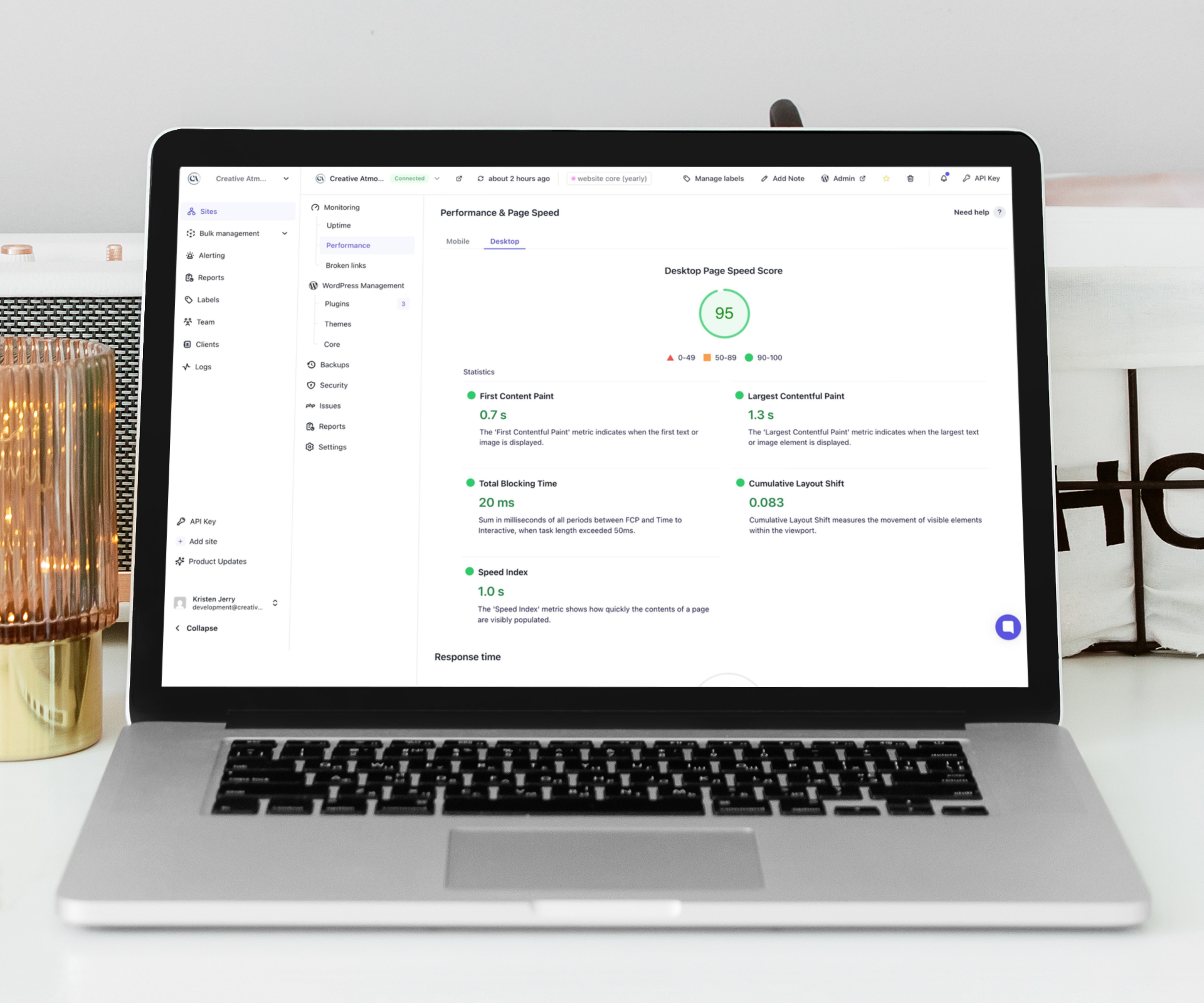
Monitoring load speed and flagging degradation. A site that gradually slows down over months is easy to miss — it’s hard to notice when the change is incremental.
Monthly reporting
A summary of what was updated, any issues found and resolved, and current site health. You should know what’s happening on your website even if you’re not logging in.
What Some Plans Include Beyond the Basics
Depending on the provider and plan tier, care plans may also include:
- A set number of content edit hours per month (updating text, swapping images, adding a new service)
- Priority support response times for urgent issues
- Google Analytics reporting and traffic summaries
- Malware removal if an infection occurs
- SSL certificate management
The content edit hours are genuinely useful for businesses that update their services or pricing periodically but don’t want to log in and make changes themselves. It turns your care plan into something closer to an ongoing partnership rather than just maintenance.
What Happens Without a Care Plan
Here’s the realistic picture.
Your site gets hacked
It’s not a matter of if — it’s a matter of whether your site is patched enough to be skipped over by the automated scripts that scan for easy targets. An outdated plugin is often all it takes.
Recovering from a hacked site is expensive and time-consuming. Depending on the severity, it can mean rebuilding from scratch. Even if you recover it, Google may flag it during the infection period — and getting that flag removed takes time.
Your site breaks after an update
WordPress updates happen frequently. Plugin developers release updates on their own schedules, often without coordinating with other plugin developers. Conflicts happen. Without someone testing after updates, a conflict can sit unnoticed — your site appears to work fine to you, but your contact form is silently failing, your checkout process is broken, or your mobile layout is mangled.
You have no backup when you need one
This is the one that hurts the most. Someone overwrites a page. A plugin deletes database content. Your host has a server failure. Without an off-site backup, the only option is to rebuild.
Most hosting companies include some form of backup — but hosting-level backups are not a substitute for a managed, tested, off-site backup as part of a care plan.
Your site slows down and you don’t notice
Page speed is a Google ranking factor and a conversion factor. A site that loaded in 1.8 seconds two years ago might be loading in 4.5 seconds today, as plugins have added overhead and the database has grown. Without monitoring, that degradation is invisible until you start wondering why your leads have dropped off.
How Much Does a Website Care Plan Cost?
For a small business WordPress site, expect to pay $50–150/month for a solid care plan from a local or Canadian provider. Plans that include content editing hours or more advanced support sit higher — $150–250/month is reasonable for plans with 1–2 hours of included edits.
The question isn’t really “is $75/month worth it.” The question is whether $75/month is worth avoiding a recovery situation that costs $500–2,000 and takes your site offline for days.
What to be cautious about
Very cheap plans ($10–20/month) typically cover automated plugin updates only — no real monitoring, no off-site backups, no human review. That’s better than nothing, but it’s not a care plan in any meaningful sense.
Also be cautious about care plans that don’t include off-site backups specifically. “We back up your site” means nothing if the backup lives on the same server as your site.
Do You Actually Need a Care Plan?
Here’s the honest answer. It depends on three things:
How important is the site to your business?
If your website is your primary way potential clients find you and contact you — if it’s doing real business work — then the cost of it going down or being compromised is real money. The care plan is insurance against that.
If your site is a simple brochure that rarely gets traffic and you have no contact form — it’s lower stakes. You might be fine with less. But even then, a hacked site can affect your email deliverability and your Google reputation.
Are you updating it yourself?
If you’re actively logging into WordPress, running updates yourself, and checking the site monthly — you’re already doing care plan work. Whether you formalize it into a paid arrangement depends on your comfort level and available time.
Most small business owners are not doing this. They set up the site, log in when they need to change something, and otherwise leave it alone. That’s when the risks accumulate.
Do you have a backup strategy?
If you can honestly answer yes — you have recent, off-site backups that you’ve tested — then your single biggest risk is covered. The rest of care plan value is convenience and monitoring.
If you can’t answer that question confidently, a care plan addresses it.
Questions to Ask When Choosing a Care Plan Provider
- Where are backups stored — on the same server or off-site?
- How often are backups taken?
- Are updates tested before applying, or just pushed automatically?
- What happens if an update breaks something?
- Is malware removal included, or billed separately if needed?
- What’s the response time if my site goes down?
- Will I get a monthly report?
A provider who can answer these clearly and specifically is a different thing from one who just says “yes, we handle all that.”
FAQ
Can’t my hosting company handle this?
Hosting companies handle server-level infrastructure. They’re not responsible for WordPress core, plugin, or theme updates. Most hosting backups are server snapshots — not the application-level, tested backups that a care plan provides. They’re different layers of the stack.
What if I built my site on Squarespace or Wix?
Those are managed platforms — the hosting company handles most maintenance automatically. The care plan model is specific to self-hosted WordPress, where the site owner is responsible for the software stack.
How do I know if my WordPress site is currently up to date?
Log into your WordPress dashboard. The main dashboard screen shows available updates for WordPress core, themes, and plugins. If you see more than a handful of pending updates — especially if some are months old — your site needs attention.
My site hasn’t had any problems so far. Do I still need this?
A site with no visible problems might have vulnerabilities you’re not seeing. Security issues often don’t manifest visibly right away — a compromised site can be used for spam or phishing for months before you notice anything. “No problems yet” isn’t the same as “no risk.”
Can I do my own backups instead of paying for a care plan?
Yes. Plugins like UpdraftPlus can automate backups to an off-site destination (Google Drive, Dropbox, an external server). If you set this up properly and check it periodically, you’ve covered your biggest risk. You’d still need to handle updates and monitoring yourself.
What happens to my care plan if I switch designers?
Care plans are typically transferable — a new designer can take over the maintenance arrangement, or you can move to a new provider. Your site remains yours throughout. The plan is a service relationship, not a lock-in.
Is a care plan the same as hosting?
No. Hosting is where your website files live. A care plan is a maintenance and monitoring service that runs on top of that. You need both. Some providers offer them bundled — which can simplify billing — but they’re separate things.
What if I only need help occasionally, not every month?
Some providers offer pay-as-you-go support or ad hoc maintenance without a monthly retainer. That works for some businesses. The trade-off is that monitoring and backups aren’t happening continuously — you’re reactive rather than proactive.
The Bottom Line
A website care plan is not glamorous. It’s not a new feature or a redesign. It’s the maintenance that keeps everything running the way it was built to run.
For most small businesses with an active WordPress site, the monthly cost of a care plan is significantly less than the cost of recovering from the problems that accumulate without one.
I offer website care plans for WordPress sites across Oxford, Brant, and Norfolk County — updates, backups, monitoring, and a monthly report so you always know your site is in good shape. If you’re not sure what’s currently happening with your site, I’m glad to take a look.